
HOMEFORUMSUPPORTDISCORD
★ TEST
✦ Welcome to the MapleVerse Test Portal! ✦  Found a bug? Report it here — paste a screenshot right from your clipboard! ✦  8 issues being tracked — thank you, testers! ✦✦ Welcome to the MapleVerse Test Portal! ✦  Found a bug? Report it here — paste a screenshot right from your clipboard! ✦  8 issues being tracked — thank you, testers! ✦
#896 Quest Chat not bound to keys FIXED
MEDIUM Quests & NPCs reported by Tai · 1 days ago · updated 5 hr ago
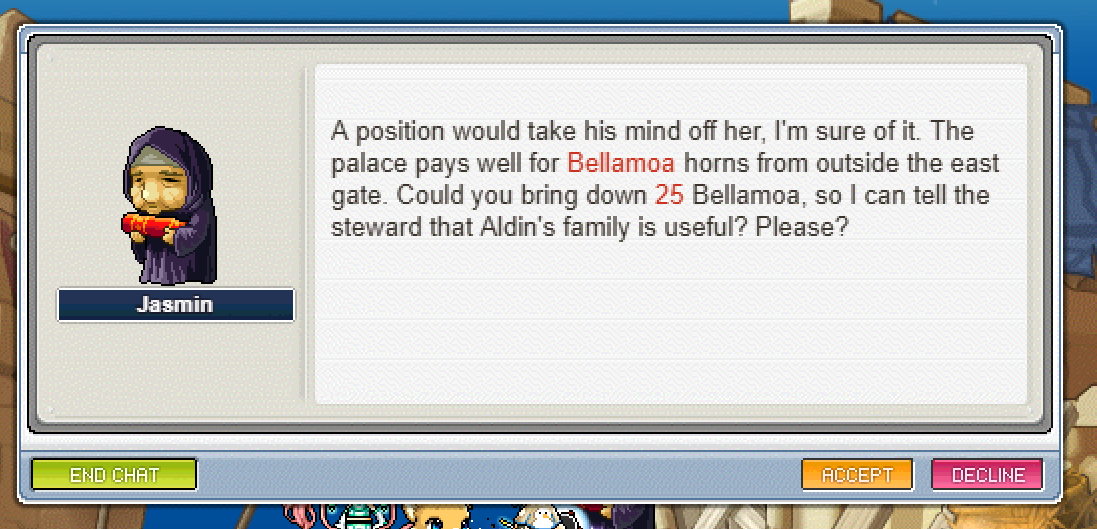
When on this screen of a quest, you should be able to press the right arrow to select accept or the left arrow to select decline.

and then Enter or Y to accept the highlighted choice.

it not being highlightable means I have to keep taking my hand off the keyboard to select accept or decline
screenshot 1
🍅 ME TOO · 0 Sign in to confirm this bug.
COMMENTS 1 reply
Mark ADMIN 5 hr ago
Thanks Tai. The NPC chat window now takes the keyboard the way the Pre-BB game does: Left and Right light up a button (Right lights Accept first, Left lights Decline), Enter presses the lit button, and Y / N answer a Yes/No or Accept/Decline page straight away. On an ordinary page Enter moves on as before. One note: with no button lit, Enter on an Accept/Decline page does nothing, so a stray Enter cannot answer for you. Please try it on any quest NPC.

Sign in with MSU to comment.