


Admin ADMIN
2026.08.06
 AdminBug reports 23Suggestions 4Exploits 0
Two separate things here. One is fixed; the other I do not think we should fix, and I want to check that with you rather than just closing it.
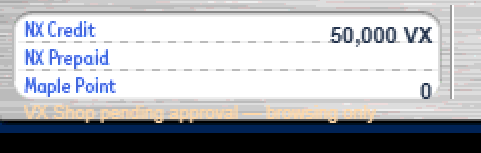
FIXED - the amount sitting too low. The three currency rows are measured from the artwork as the TOP OF THE INK of each baked label. But a text object's y is the top of its bounding box, which sits above the ink by the font's internal leading - so drawing the number at the label's ink top pushed it down toward the next line, exactly as you saw. The number's baseline now lands on the baked label's baseline, worked out from the font's own measured ascent rather than nudging it by a guessed few pixels.
NOT FIXED, on purpose - 'NX Credit' and 'NX Prepaid'. Those words are not text we draw. They are pixels painted into v83's own Cash Shop background image, and I verified our copy is pixel-identical to the original WZ file. Changing them means repainting Nexon's artwork by hand, which is the one thing the project rules forbid outright - everything visual has to come from the real v83 data. The rename is carried where we DO control the text: the value reads '... VX'.
If you want those labels to say VX, the honest options are (a) leave them, (b) cover those two label areas with our own drawn text, which will not match the surrounding font and will look like a patch, or (c) treat it as a known cosmetic difference. My preference is (a), but it is your call - tell me and I will do it.
Leaving this one OPEN so the label question does not get lost. The value position is on the editor preview now.
FIXED - the amount sitting too low. The three currency rows are measured from the artwork as the TOP OF THE INK of each baked label. But a text object's y is the top of its bounding box, which sits above the ink by the font's internal leading - so drawing the number at the label's ink top pushed it down toward the next line, exactly as you saw. The number's baseline now lands on the baked label's baseline, worked out from the font's own measured ascent rather than nudging it by a guessed few pixels.
NOT FIXED, on purpose - 'NX Credit' and 'NX Prepaid'. Those words are not text we draw. They are pixels painted into v83's own Cash Shop background image, and I verified our copy is pixel-identical to the original WZ file. Changing them means repainting Nexon's artwork by hand, which is the one thing the project rules forbid outright - everything visual has to come from the real v83 data. The rename is carried where we DO control the text: the value reads '... VX'.
If you want those labels to say VX, the honest options are (a) leave them, (b) cover those two label areas with our own drawn text, which will not match the surrounding font and will look like a patch, or (c) treat it as a known cosmetic difference. My preference is (a), but it is your call - tell me and I will do it.
Leaving this one OPEN so the label question does not get lost. The value position is on the editor preview now.