
HOMEFORUMSUPPORTDISCORD
★ TEST
✦ Welcome to the MapleVerse Test Portal! ✦  Found a bug? Report it here — paste a screenshot right from your clipboard! ✦  8 issues being tracked — thank you, testers! ✦✦ Welcome to the MapleVerse Test Portal! ✦  Found a bug? Report it here — paste a screenshot right from your clipboard! ✦  8 issues being tracked — thank you, testers! ✦
#570 Music Player - Nice to Haves FIXED
LOW Sound & Music reported by Tai · 18 days ago · updated 18 days ago
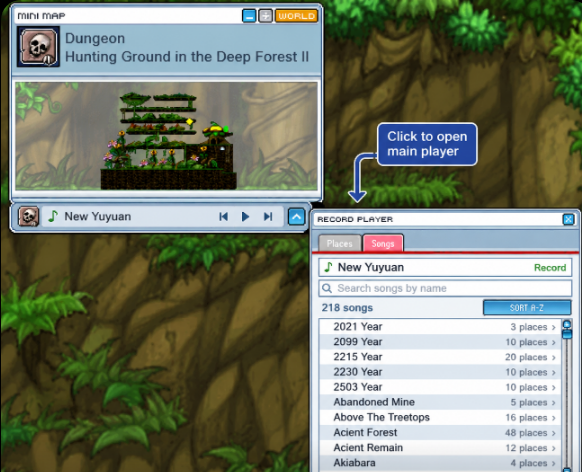
Could you add a small "mini player" locked to the bottom of the mini map.
It'd be like a
• hotkey button to open it to the fullsize one,
(the fullsize one should open at the top of the map ui not down and across.)
screen clarity.
• a skip/pause/play button.
• the name of the currently playing song.


And also under the main player
- a Favorates Tab,
• Where you can favourate songs from the main lists (a small gold star on the far right?)
• add to simple play lists.
(when you favorate it could be default, or a drop down to a playlist you setup in favourates.

- tab "Songs"
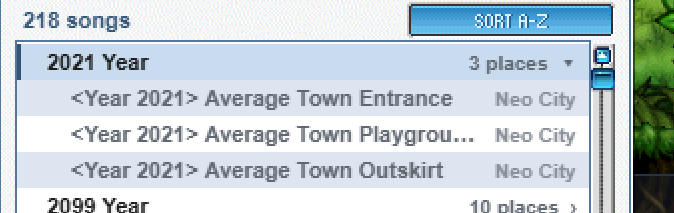
• Once you Expand Places, you can unexpand it
• Can this be secondary as it doesn't do anything directly.
• Nicer to just be able to select the next song in the list, but investigate the location as an optional user experiance.

- extra tab for sound settings
just to adjust with ease.
screenshot 1screenshot 2
🍅 ME TOO · 0 Sign in to confirm this bug.
COMMENTS 2 replies
Admin ADMIN 18 days ago

Love this list, tai, and we're building all of it: the mini player docked under the minimap (song name, play/pause, skip, open the full player at the top), a Favourites tab with gold stars and simple playlists, a Songs list you can play straight from with Places as an optional collapsible view, and a Sound tab for quick volume changes. Will update here when it's in the game.
Admin ADMIN 18 days ago
Your Record Player wishes came true, tai! A little player now rides just under your minimap, showing the song that's spinning, with play/pause, skip, and an arrow that opens the full player right up top beside the map. In the big player, Songs comes first: tap any song to hear it, and tap its places to fold them open and closed again. Tap the gold star to keep a song in Favourites, gather songs into your own named playlists, and play them in order or shuffled. There's a Sound tab for quick music and sound-effect volume and mute, and it changes the same settings as Game Option. You can hide the mini player from the Sound tab too. LIVE now (refresh the game to pick it up).

Sign in with MSU to comment.