


Admin ADMIN
2026.08.06
 AdminBug reports 23Suggestions 4Exploits 0
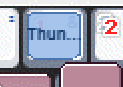
Fixed - a bound skill now shows its own icon on the key, same as the action and emote keys already did.
The key faces already knew how to draw an icon; that path only ever ran for actions and emotes. Skills fell through to a small text chip, because at some point skills were assumed to have no icon available in this window. They do - the quick-slot bar and the skill list were already resolving the real Skill.wz icon for the same skills, so it was just never wired up here.
It draws at the same size and anchor as the action icons (32x32, native, bottom-left), and the name chip is kept as a fallback for the split second before the icon finishes loading, so a key is never blank.
This also finishes off what you reported in #46 - between the two, dragging a skill now shows its real name while dragging and its real icon once dropped.
On the editor preview now; reaches the public build with the next publish.
The key faces already knew how to draw an icon; that path only ever ran for actions and emotes. Skills fell through to a small text chip, because at some point skills were assumed to have no icon available in this window. They do - the quick-slot bar and the skill list were already resolving the real Skill.wz icon for the same skills, so it was just never wired up here.
It draws at the same size and anchor as the action icons (32x32, native, bottom-left), and the name chip is kept as a fallback for the split second before the icon finishes loading, so a key is never blank.
This also finishes off what you reported in #46 - between the two, dragging a skill now shows its real name while dragging and its real icon once dropped.
On the editor preview now; reaches the public build with the next publish.