
HOMEFORUMSUPPORTDISCORD
★ TEST
✦ Welcome to the MapleVerse Test Portal! ✦  Found a bug? Report it here — paste a screenshot right from your clipboard! ✦  8 issues being tracked — thank you, testers! ✦✦ Welcome to the MapleVerse Test Portal! ✦  Found a bug? Report it here — paste a screenshot right from your clipboard! ✦  8 issues being tracked — thank you, testers! ✦
#451 Combo Key for better controller support FIXED
LOW Gameplay reported by chubby · 29 days ago · updated 28 days ago
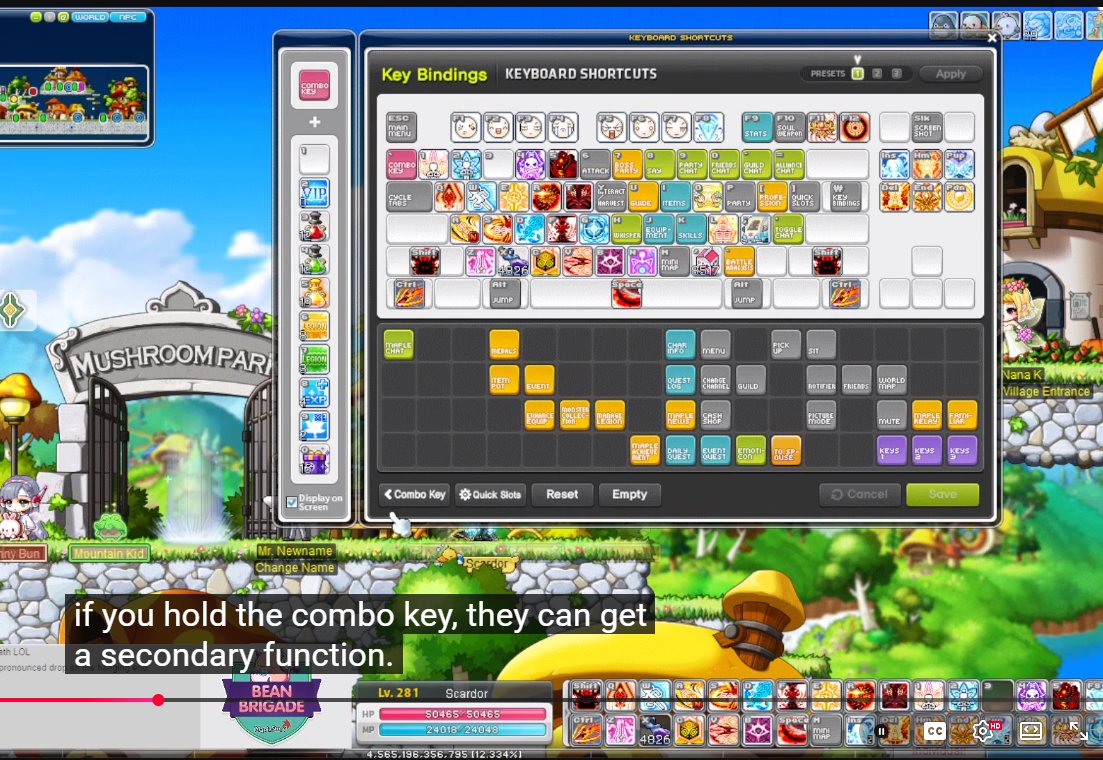
When using a controller with limited keys, you usually can't use all the skills you have without removing some key bindings for items such as mp/hp potions and potions for removing debuffs. With the Combo Key, you can have almost double the slots for key bindings. For example, you can bind 4 skills to 1234, then more skills and potions to arrow key up + 1234.
screenshot 1
🍅 ME TOO · 0 Sign in to confirm this bug.
COMMENTS 1 reply
Admin ADMIN 28 days ago

The Combo Key is here for controller players! In Key Config, drag the new Combo chip onto any key, then flip 'Combo Layer' on and drop a second set of skills, potions or functions onto your keys. Hold Combo and those keys fire the second set; let go and everything works as before. Arrow keys still move you even with Combo on them, so a face button or spare key works best. (Attack, Jump, Pick Up and NPC Chat stay on the normal layer only.) This is LIVE now: refresh the game to pick it up.

Sign in with MSU to comment.