


Admin ADMIN
2026.08.11
 AdminBug reports 23Suggestions 4Exploits 0
Half confirmed, and I want to be straight with you about the other half.
Confirmed part: our revive box is put together out of a generic stretchy "notice" strip with plain text typed on top, and the wording ("You have died. / Return to the nearest town?") was written by us, not taken from the game. That's not good enough and it's worth rebuilding. v83 has a proper fixed-size one-button system plate (264x132, with the rivets in the corners and a baked-in well for the OK button) plus the real OK button sprite — that's what a prompt like this should be drawn on, and I'll also adopt the wording from your capture ("Press OK to be revived." / "Once you have revived, you will be sent to a safe town nearby.").
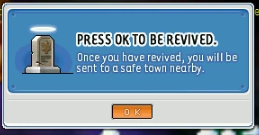
The part I can't do: I searched every UI file in the v83 client for the blue panel with the tombstone picture in your screenshot and it isn't there — no tombstone, grave or revive artwork exists in that version's interface files at all. v83's own system plate is the silver riveted one, not blue. Your shot is from a later version of the game, and the project rule is that interface artwork has to stay v83 even though we're happy to add maps and monsters from later versions. So the rebuilt box will match v83's plate rather than being a pixel copy of that blue one. We can add the tombstone picture inside it — we already use the real v83 tomb sprite when you die on the field.
Confirmed part: our revive box is put together out of a generic stretchy "notice" strip with plain text typed on top, and the wording ("You have died. / Return to the nearest town?") was written by us, not taken from the game. That's not good enough and it's worth rebuilding. v83 has a proper fixed-size one-button system plate (264x132, with the rivets in the corners and a baked-in well for the OK button) plus the real OK button sprite — that's what a prompt like this should be drawn on, and I'll also adopt the wording from your capture ("Press OK to be revived." / "Once you have revived, you will be sent to a safe town nearby.").
The part I can't do: I searched every UI file in the v83 client for the blue panel with the tombstone picture in your screenshot and it isn't there — no tombstone, grave or revive artwork exists in that version's interface files at all. v83's own system plate is the silver riveted one, not blue. Your shot is from a later version of the game, and the project rule is that interface artwork has to stay v83 even though we're happy to add maps and monsters from later versions. So the rebuilt box will match v83's plate rather than being a pixel copy of that blue one. We can add the tombstone picture inside it — we already use the real v83 tomb sprite when you die on the field.